
 Monday to Friday: 10:00 AM – 6:00 PM
 Talk with us:
 How attendance, leave, overtime and LOP affect payroll
The payroll run begins before anyone presses “process”. Here is a practical way to turn everyday attendance events into approved salary inputs without losing track of the exceptions.

One payroll decision trail.
A missing punch, a pending leave request and an approved overtime entry can all sit against the same employee in the same month. If those records reach payroll in separate files, someone must reconcile which version is final. The better starting point is a clearly owned review process.
Why attendance data alone cannot finish a payroll run
An attendance system records events. A payroll team needs decisions: Was the employee scheduled to work? Was the absence covered by approved leave? Was the extra time eligible and approved? Is a correction still pending?
Those decisions depend on the organization’s configured policies and approval roles. The goal is to move a reviewed result into payroll, with enough context to explain it later. This matters especially when office, factory and field teams use different ways to mark attendance.
For an example of those attendance sources coming together, see Ashwamedh’s field and biometric attendance case study.
What should happen to each record before payroll?
Use this as a review map, then apply your approved company rules. It is deliberately a workflow rather than a universal salary formula.
| Input | What HR checks | Payroll handoff |
|---|---|---|
| Attendance | Punches or mobile check-ins, schedule, late or missing entries, and manager corrections. | Approved payable days or hours and a list of unresolved exceptions. |
| Leave | Request status, leave type, date overlap, balance and applicable policy. | Approved paid or unpaid leave classification for the cycle. |
| Overtime | Eligibility, recorded duration, authorization and the applicable rule or rate. | Verified overtime input, where payable under the policy and applicable requirements. |
| LOP | Unpaid days, payroll-day basis, selected salary components and any correction or reversal. | Approved LOP instruction with an audit trail for review. |
A pending leave request, a missed punch or a delayed field approval may change the outcome. Keep the exception visible until the authorized person resolves it.
For component-wise calculations, revisions and reversals, read the existing MYHR Loss of Pay management guide.
A four-step attendance-to-payroll workflow
The exact sequence can change by organization. These four checkpoints make ownership and cut-off decisions clear.
Bring office, biometric, mobile, shift and approved leave data into a common review period.
Managers check missing punches, leave overlap and eligible extra hours.
HR confirms paid days, overtime and LOP according to policy and cut-off.
Payroll calculates, checks variances and prepares payslips and reports.
Agree who can change an approved record and how that change is logged. A late correction might belong in the current run, or it might need a controlled adjustment in a later run; this is a policy and cut-off decision.
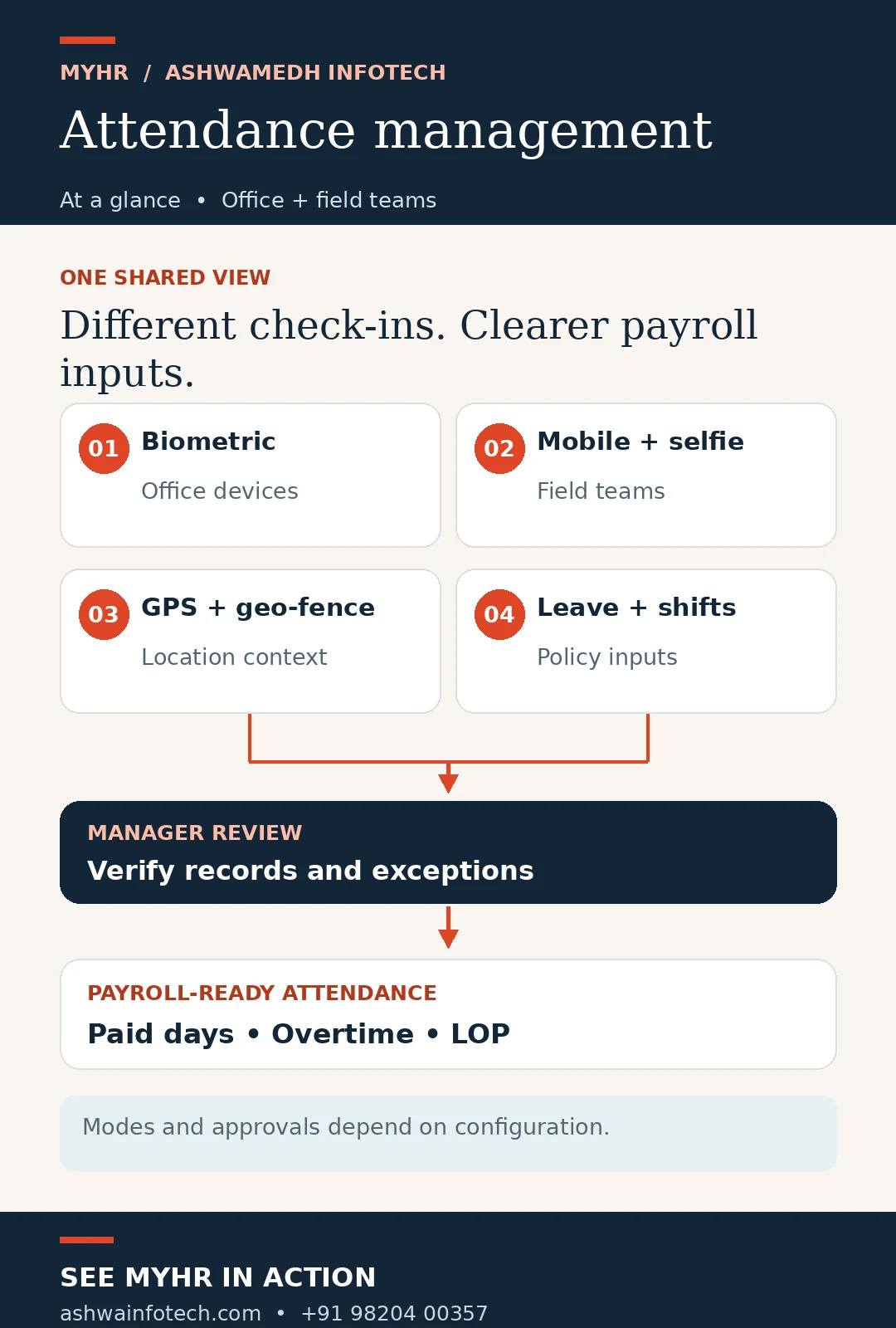 Open the attendance workflow infographic at full size ↗
One employee, three exceptions: what reaches payroll?
Do not calculate the salary yet.
A field employee has one missing check-in, one pending leave request and two hours of extra work submitted for approval. The records describe activity, but none of the three exceptions is ready to become a final payroll input.
- The manager verifies the site visit and corrects or declines the missing check-in.
- HR resolves the leave request against the relevant balance and policy.
- The authorized approver confirms whether the extra hours qualify as payable overtime.
- Only the reviewed paid-day, overtime and possible LOP outcomes move to payroll.
If the missing check-in is validated, it should not remain an unexplained absence. If leave is declined and the absence is unpaid under policy, LOP may apply. The result comes from the approvals, rather than a guess from raw punches.
Still reconciling attendance in spreadsheets?
Show us your locations, approval chain and month-end cut-off. We can map the MYHR modules and configuration needed for a cleaner handoff.
Request a MYHR walkthroughA short review checklist for HR and payroll
- Confirm the attendance period and which locations or employee groups are included.
- List missing punches, pending field check-ins and schedule exceptions.
- Resolve leave requests and check for overlapping dates or changed balances.
- Separate recorded extra hours from approved, payable overtime.
- Review potential LOP days, payroll-day basis and any prior-month correction.
- Get the right manager and HR approvals before handing inputs to payroll.
- Check payroll variances and keep a record of changes made after the cut-off.
This checklist helps organize the process; your organization should confirm its own policy and applicable requirements before processing pay.
Where MYHR fits into this workflow
MYHR can connect configured attendance, leave and payroll processes so HR works from reviewed records rather than unrelated spreadsheets. The published field-workforce case study describes existing ESSL biometric devices alongside mobile, selfie, GPS and geo-fenced attendance, with manager review before central HR and payroll visibility.
The exact modules, device integrations, approval roles and payroll rules depend on the chosen plan and implementation. Explore attendance management software for India, MYHR payroll and HRMS software in Mumbai, or payroll processing services for the corresponding solution.
Questions HR teams raise at month-end
Does every missing attendance punch become LOP?
No. The entry should be checked against the schedule, available evidence, approved leave and the organization’s correction process before any unpaid-day decision.
Does approved leave always mean a paid day?
No. Leave types and balances may have different treatment under your policy. Payroll needs the approved classification, not only a request marked as submitted.
Should every extra hour be paid as overtime?
Recorded time alone does not establish payability. Confirm eligibility, authorization, the relevant rule and applicable requirements before sending an overtime input to payroll.
Can a late attendance correction affect a closed payroll cycle?
It can require a controlled adjustment or reversal. The timing and method depend on your payroll cut-off and configured policy; retain the original and corrected records.
Make month-end payroll easier to review.
Tell us where attendance arrives from, who approves exceptions and what slows down your payroll closure. We’ll discuss a MYHR setup suited to your team.
Call +91 98204 00357