
 Monday to Friday: 10:00 AM – 6:00 PM
 Talk with us:
 How to manage payroll across offices, branches and factories
A central payroll team needs one reliable monthly view. Each location still needs ownership of its employees and exceptions. Here is a practical operating model for keeping those responsibilities clear.

Clear local ownership.
Payroll across several locations often starts with good intentions: each office or factory sends a spreadsheet to Head Office, which combines the files and checks the totals. The difficulty is usually not the final addition. It is knowing which employee record, attendance exception, salary change and approval is the latest one.
A workable model gives every location a defined part of the process while retaining central oversight. The exact roles, cut-offs and calculation rules should reflect the organization’s policies and system configuration.
What goes wrong when every location runs payroll separately?
Each site may know its employees well, but independent payroll files create a second job for Head Office. It must combine registers, reconcile employee transfers, identify duplicate or missing changes, and answer questions from several versions of the same month.
- An employee transfer may appear at the old and new location unless the effective date is clear.
- Late attendance or LOP corrections may arrive after another site’s figures have already been finalized.
- Head Office cannot tell whether a location has only submitted inputs or actually approved its payroll.
- Reports for management and statutory work take longer to prepare when processed data is spread across files.
The aim is a reliable handoff: one source for the current payroll cycle, visible responsibility for each step and an agreed way to handle exceptions.
Centralize the run; keep data ownership close to the employee.
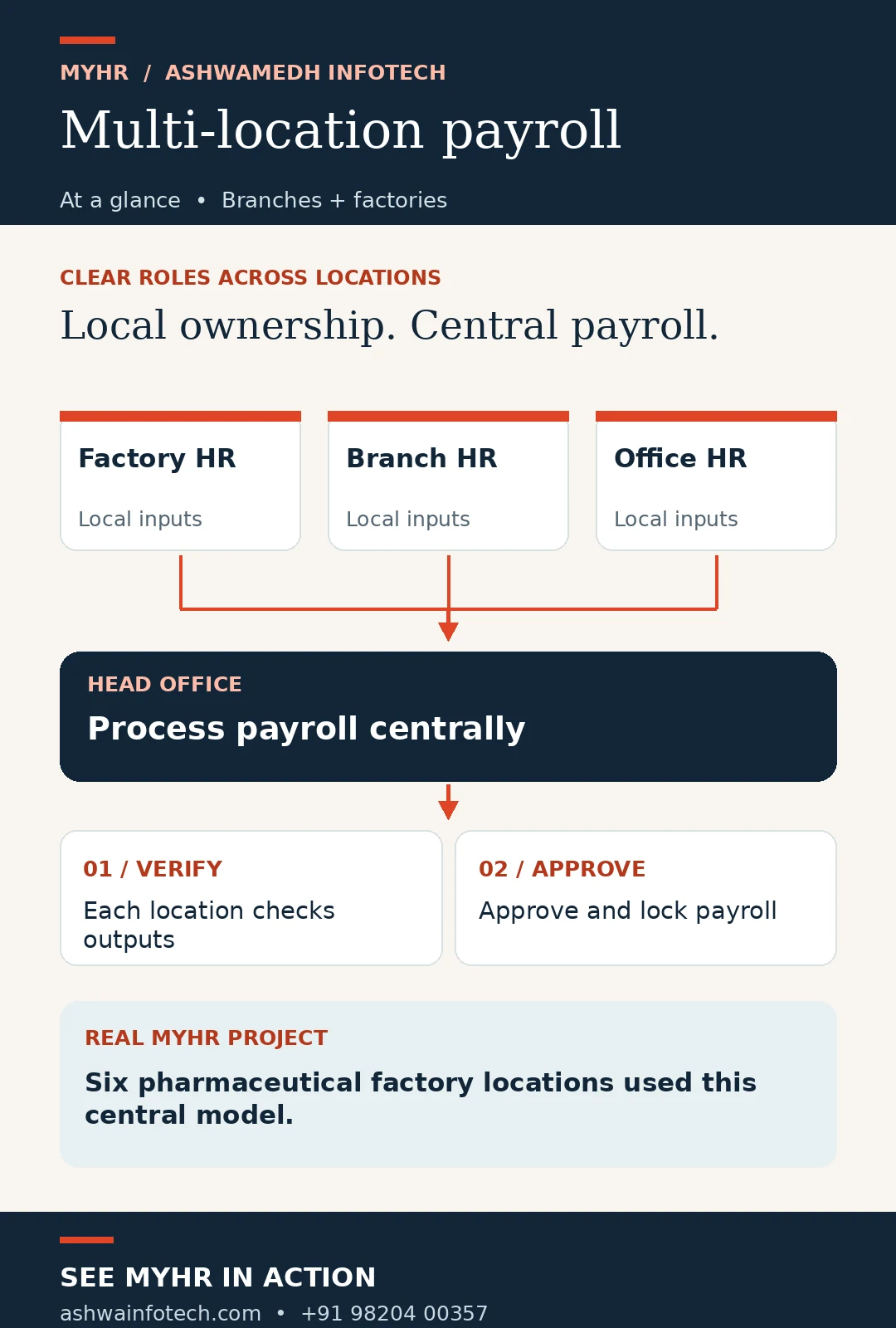
Local coordinators are best placed to confirm whether a shift was worked, a leave request was approved or a salary input changed. The central payroll team can apply the configured rules and review the organization-wide result. After processing, each site should check its own register and formally sign off.
If a factory spots an error after the first payroll run, can you correct that factory’s data without reopening approved payroll for every other location? Decide how this should work before the monthly cut-off.
In Ashwamedh’s six-factory MYHR case study, local factory teams retained ownership of their employees while Head Office processed payroll centrally. That example is the basis for the workflow below; your organization’s permissions and approvals may differ.
A month-end workflow for multiple locations
The number of sites may change, but each handoff needs a named owner and a visible status.
Each site reviews employee changes, attendance, LOP and other approved monthly inputs.
Head Office processes payroll once the agreed inputs and cut-off are complete.
Each location checks its salary register, variances and exception report.
Authorized reviewers sign off; approved results are protected from routine changes.
If a location finds an error before final approval, the team should correct and reprocess that location according to its controlled workflow. After approval, an exceptional unlock should require a separately authorized role and a recorded reason.
 Open the multi-location payroll workflow infographic at full size ↗
Who should own each step?
The following role map is a practical starting point, adapted from the published six-factory MYHR project. Assign actual names, backups and cut-off times in your own process.
| Activity | Primary owner | Evidence to retain |
|---|---|---|
| Employee and monthly input updates | Local HR or payroll coordinator | Change details, effective dates and approvals. |
| Payroll processing | Head Office payroll officer | Run status, calculation date and variance review. |
| Location result review | Authorized local reviewer | Register, exception resolution and sign-off. |
| Exceptional unlock | Separately authorized administrator | Reason, approval and corrected result. |
| Consolidated reporting | Head Office payroll or finance | Location-wise and combined reports. |
Role-based access also limits who sees or changes employee data. Confirm visibility and permission rules during implementation, particularly for transfers, shared services and temporary sites.
What the six-factory project shows
Six factory locations, one controlled payroll process.
A pharmaceutical manufacturer had been running payroll separately at each factory. In the published project, MYHR gave each factory location-wise access for employee and monthly inputs while Head Office processed payroll centrally.
- Factory teams updated salary, LOP and exception inputs for their own employees.
- Head Office ran the payroll and shared location-wise registers and reports.
- Each factory verified its results and raised corrections before final approval.
- Approved payroll was locked; an authorized Super Administrator controlled exceptional unlocking.
Read the full six-factory case study for the configuration, responsibilities and business context. This is a project example, not a claim that every MYHR setup uses identical roles.
How many payroll handoffs happen at your sites?
Share your locations, current cut-offs and approval chain. Ashwamedh can show how MYHR could be configured around that structure.
Request a workflow consultationA checklist for the next payroll cycle
- List every office, branch, factory and employee group included in the run.
- Confirm location ownership for new hires, exits and transfers as of the payroll cut-off.
- Set a deadline for attendance, leave, overtime, LOP and salary input approval.
- Mark each site’s status clearly: preparing, submitted, processed, under review or approved.
- Compare location-wise payroll totals and investigate unusual movements before sign-off.
- Record the correction path for a site that finds an error before approval.
- Restrict and log any change made after an approved location is locked.
- Prepare both site-level and consolidated reports from the reviewed payroll data.
This is an operational checklist. Your payroll policy, statutory obligations and approval authority should be confirmed by the responsible teams.
Where MYHR can support the process
MYHR’s published case study demonstrates location-wise profiles, role-based access, central processing, local verification, controlled correction and consolidated reporting. The best configuration depends on your employee structure, locations, rules and selected plan.
For the solution itself, explore multi-location payroll software. Teams with shift-heavy factories can also review payroll software for manufacturing companies. If you need support with the monthly service process, see payroll processing services.
Questions before centralizing payroll
Does central processing remove local HR control?
It need not. In the published MYHR six-factory project, local teams maintained employee inputs and verified their own results while Head Office processed the shared payroll run.
What if only one branch finds an error?
Define a location-specific correction path before final approval. In the case study, the concerned location could be reopened, corrected and reprocessed without disturbing other locations.
Who should approve a location’s payroll?
An authorized reviewer with enough knowledge of that location’s employees should check its salary register and exceptions. Record the approver and cut-off in your process.
Can an approved payroll be changed?
It should require an exceptional, controlled action. In the published MYHR project, approved location payroll was locked and only an authorized Super Administrator could unlock it.
Is this approach only for factories?
No. The operating model can be considered for offices, branches, project sites and factories. The exact setup depends on the organization and selected MYHR configuration.
Bring your locations into one clearer monthly process.
Tell us how many sites you manage, who owns the monthly inputs and where approvals slow down. We can discuss a practical MYHR walkthrough for your team.
Call +91 98204 00357